Wednesday, 31 July 2013

Schema Extension in SCCM - Demystified Complete

In one of my earlier posts I have given a lot of Details about SCCM Schema Extension , However In this Post I want to Demystify this topic Completely .

As we are already aware of that when we Extend the AD schema a set of 4 classes and 14 attributes are added in Active directory .

Now , Let us say that I do not Extend the Ad schema , The very First question that will come to our minds will be " How would ccmsetup.exe Discover the Management Point and get the specific retirements . As a workaround to this , what we do is that in the Command line used to install client we give management point , site code etc like CCMSetup.exe /mp:SMSMP01 /logon SMSSITECODE=S01 FSP=SMSFSP01.

You May also use SLP

It is very Important to note that if we do not extend the AD schema global roaming and NAP will not be implemented .

Tuesday, 30 July 2013

SCCM 2012 and SCORCH( System Center Orchestrator Manager) Intergration

Off Late , With System Center , a lot of new things have happened which have made life easy for Admins !! One such kind i SCCM 2012 and Orchestrator Integration . With this Integration you can achieve a lot of new things , Streamline Processes , Automate them and a lot .

One such example is being discussed in the Post below :

http://blogs.technet.com/b/neilp/archive/2012/08/08/configuration-manager-and-orchestrator-2012-using-status-message-as-a-runbook-trigger-mechanism.aspx


Monday, 29 July 2013

SCCM Interview Questions , HCL, WIPRO, TCS , COGNIZANT , ITC INFOTECH

Off Late I have been in touch with a lot of SCCM Admins who have been giving Interviews in Various Companies . I have noticed a pattern which is specific to specific companies . Some of the generic questions being asked are :

What is the difference Between Query and a Report ?
What is difference between Refreshing a collection and updating a collection ?
What are the log files to check for software distribution ?
What is the difference between Program and Application ?
Why do we Extend AD Schema ? Is it a Mandatory Step ?
What is the Difference Between Hardware Inventory and Software Inventory ?
What are log files for Inventory ?
How can we check if the SCCM Server management Point is Up and Running ?
What are SCCM management Point Log Files ?
What is the Difference Between Distribution Point and Secondary Site ?
What is Branch Cache ?
What are Log Files for Patch Management ?
What is the Concept of Content Library ?
What is the Log Files which you will check to Trouble Shoot OSD Issues ?
Some Reporting Related Questions Could be :

Write a SQl Script to find all the programs in Add Remove Programs

Write a SQl to find Xp machines in the Environment


Trust me !! If you have Answers to these questions , you will get 50 % questions similar to ones mentioned above ( Unless the Interviewer sees this post ;-) )

Application /Software Deployment SCCM – Part # 5( Application Request - Contd.)

http://sccmconfighelp.wordpress.com/2013/07/24/applications-demystified-part-1/   - Part 1

http://sccmconfighelp.wordpress.com/2013/07/25/sccm-applications-demystified-part-2-requirement/ - Part 2

http://sccmconfighelp.wordpress.com/2013/07/25/sccm-applications-demystified-part-2-detection-rules/   Part 3

http://sccmconfighelp.wordpress.com/2013/07/29/sccm-applications-demystified-part-4-application-request/ Part 4

http://sccmconfighelp.wordpress.com/2013/07/29/sccm-applications-demystified-part-5-application-request-contd/  - Part 5

As an Extension to my Last post on SCCM Application request , I am Using A link to a Good Link here where you can get a Tool ( In case you do not have Other Components of System center - 2012 Like Service manager ) , Which can be used to Send Emails to a set of people who would Approve the requests for Software / Application :

Image

Usage : Let us Say that a user requests for an Application ( Which is a Good Practice ) , Now Under the Standard SCCM 2012 Capability you will not be able to Send Emails to Anyone who can approve  the request . The Only way left was to refresh the SCCM Console regularly .

Now you can use this Link to Download Tool To Send Emails :

http://blog.coretech.dk/kea/enabling-email-approvals-for-your-requested-applications-in-configuration-manager-2012/

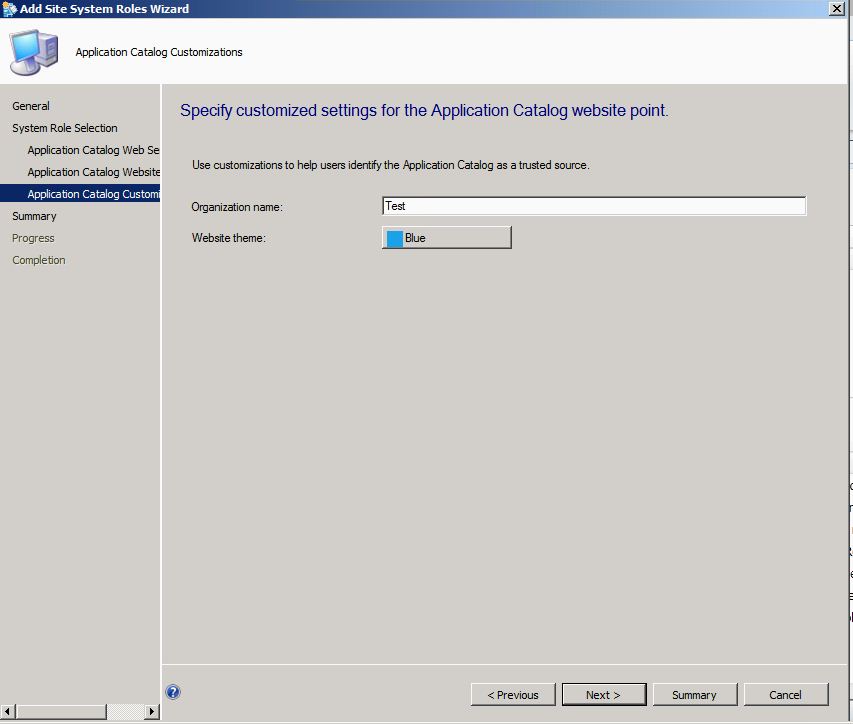
Errror - File Not Found - Application Catalog Error

If you have Faced this Error then In this Post you will find the solution to the problem .

Image


Go to Site Server Roles and Add New role 


Image


Image


Image


Image


Image


Image


Once you have Done all this , Open CMApplicationCatalog and you will be all fine 


Image

Application /Software Deployment SCCM – Part # 4 ( Application Request)

http://sccmconfighelp.wordpress.com/2013/07/24/applications-demystified-part-1/   - Part 1

http://sccmconfighelp.wordpress.com/2013/07/25/sccm-applications-demystified-part-2-requirement/ - Part 2

http://sccmconfighelp.wordpress.com/2013/07/25/sccm-applications-demystified-part-2-detection-rules/   Part 3

http://sccmconfighelp.wordpress.com/2013/07/29/sccm-applications-demystified-part-4-application-request/ Part 4

http://sccmconfighelp.wordpress.com/2013/07/29/sccm-applications-demystified-part-5-application-request-contd/  - Part 5

As has always been , I am trying to Demystify Some of the Coolest new features of SCCM 2012 . One such feature in this series of SCCM Applications Demystified I am Taking up Application request By Client in SCCM .

In SCCM 2012 , You can Deploy a Software on USers Machine and let the User see if he needs the Software . Once the user identifies the Software he Needs , He will request the software via Application Catalog and the software request will then go to SCCM Admin who will then approve or reject the Request .
 Now Isn't that a Cool Feature :

Screen Shots Attached Below :

Image

Image

Image

Image

Image

Sunday, 28 July 2013

Simulate Deployment - SCCM 2012 - A real Cool Feature

Guys !! here I am , Back with my Posts .

Well !! This time we will discuss a new topic which was not there with Previous Versions of SCCM . Now Consider a scenario where you are not sure How a Deployment would behave on Users machine Like dependencies, Requirements , Detection Methods .

In such a case , we wish we had a method of Actually checking how this application/ software would have behaved . But Yes !! with SCCM 2012 We have what we Call Simulated Deployments .

Below are the steps to create and check Simulated deployment !!

Note **** An Important note is that once you have checked the results by Simulated deployment , delete it before you deploy the actual Software . actual Deployment will not work unless Simulated deployment is not deleted . 


Image


Click on Simulated deployment in Upper Tray .

Image


Image


Image