Friday, 2 August 2013

Native Mode - No More in SCCM 2012

Image


As all Configuration Manager customers know, security is challenging and often requires complex setup configurations. Setting up a Certificate Authority, issuing certificates, and maintaining them can be a herculean task, and in most cases involves interacting with multiple teams in an organization.

It is the price we pay to have a highly secure environment, where the administrators, executives, and employees don’t have to worry about their data being compromised.

Configuration Manger leverages an existing PKI infrastructure to enable secure communication between clients and site system roles.

Before System Center Configuration Manager 2012, Configuration Manager 2007 had concepts called native mode and mixed mode: The philosophy behind native mode was to secure the site server and all its site systems, in addition to securing all site-to-site communication. This involved configuring a site signing certificate on all installed sites, plus there was an added restriction that a native mode site must always report to a native mode site.

During the planning phase for System Center 2012 Configuration Manager, we listened to customer feedback and revisited this native and mixed mode model, and debated our previous concept of securing the site. The result was client computer communication.

Complete Post can be found here : http://blogs.technet.com/b/configmgrteam/archive/2012/05/25/system-center-2012-configuration-manager-r-i-p-native-mode.aspx

Wednesday, 31 July 2013

Schema Extension in SCCM - Demystified Complete

In one of my earlier posts I have given a lot of Details about SCCM Schema Extension , However In this Post I want to Demystify this topic Completely .

As we are already aware of that when we Extend the AD schema a set of 4 classes and 14 attributes are added in Active directory .

Now , Let us say that I do not Extend the Ad schema , The very First question that will come to our minds will be " How would ccmsetup.exe Discover the Management Point and get the specific retirements . As a workaround to this , what we do is that in the Command line used to install client we give management point , site code etc like CCMSetup.exe /mp:SMSMP01 /logon SMSSITECODE=S01 FSP=SMSFSP01.

You May also use SLP

It is very Important to note that if we do not extend the AD schema global roaming and NAP will not be implemented .

Tuesday, 30 July 2013

SCCM 2012 and SCORCH( System Center Orchestrator Manager) Intergration

Off Late , With System Center , a lot of new things have happened which have made life easy for Admins !! One such kind i SCCM 2012 and Orchestrator Integration . With this Integration you can achieve a lot of new things , Streamline Processes , Automate them and a lot .

One such example is being discussed in the Post below :

http://blogs.technet.com/b/neilp/archive/2012/08/08/configuration-manager-and-orchestrator-2012-using-status-message-as-a-runbook-trigger-mechanism.aspx


Monday, 29 July 2013

SCCM Interview Questions , HCL, WIPRO, TCS , COGNIZANT , ITC INFOTECH

Off Late I have been in touch with a lot of SCCM Admins who have been giving Interviews in Various Companies . I have noticed a pattern which is specific to specific companies . Some of the generic questions being asked are :

What is the difference Between Query and a Report ?
What is difference between Refreshing a collection and updating a collection ?
What are the log files to check for software distribution ?
What is the difference between Program and Application ?
Why do we Extend AD Schema ? Is it a Mandatory Step ?
What is the Difference Between Hardware Inventory and Software Inventory ?
What are log files for Inventory ?
How can we check if the SCCM Server management Point is Up and Running ?
What are SCCM management Point Log Files ?
What is the Difference Between Distribution Point and Secondary Site ?
What is Branch Cache ?
What are Log Files for Patch Management ?
What is the Concept of Content Library ?
What is the Log Files which you will check to Trouble Shoot OSD Issues ?
Some Reporting Related Questions Could be :

Write a SQl Script to find all the programs in Add Remove Programs

Write a SQl to find Xp machines in the Environment


Trust me !! If you have Answers to these questions , you will get 50 % questions similar to ones mentioned above ( Unless the Interviewer sees this post ;-) )

Application /Software Deployment SCCM – Part # 5( Application Request - Contd.)

http://sccmconfighelp.wordpress.com/2013/07/24/applications-demystified-part-1/   - Part 1

http://sccmconfighelp.wordpress.com/2013/07/25/sccm-applications-demystified-part-2-requirement/ - Part 2

http://sccmconfighelp.wordpress.com/2013/07/25/sccm-applications-demystified-part-2-detection-rules/   Part 3

http://sccmconfighelp.wordpress.com/2013/07/29/sccm-applications-demystified-part-4-application-request/ Part 4

http://sccmconfighelp.wordpress.com/2013/07/29/sccm-applications-demystified-part-5-application-request-contd/  - Part 5

As an Extension to my Last post on SCCM Application request , I am Using A link to a Good Link here where you can get a Tool ( In case you do not have Other Components of System center - 2012 Like Service manager ) , Which can be used to Send Emails to a set of people who would Approve the requests for Software / Application :

Image

Usage : Let us Say that a user requests for an Application ( Which is a Good Practice ) , Now Under the Standard SCCM 2012 Capability you will not be able to Send Emails to Anyone who can approve  the request . The Only way left was to refresh the SCCM Console regularly .

Now you can use this Link to Download Tool To Send Emails :

http://blog.coretech.dk/kea/enabling-email-approvals-for-your-requested-applications-in-configuration-manager-2012/

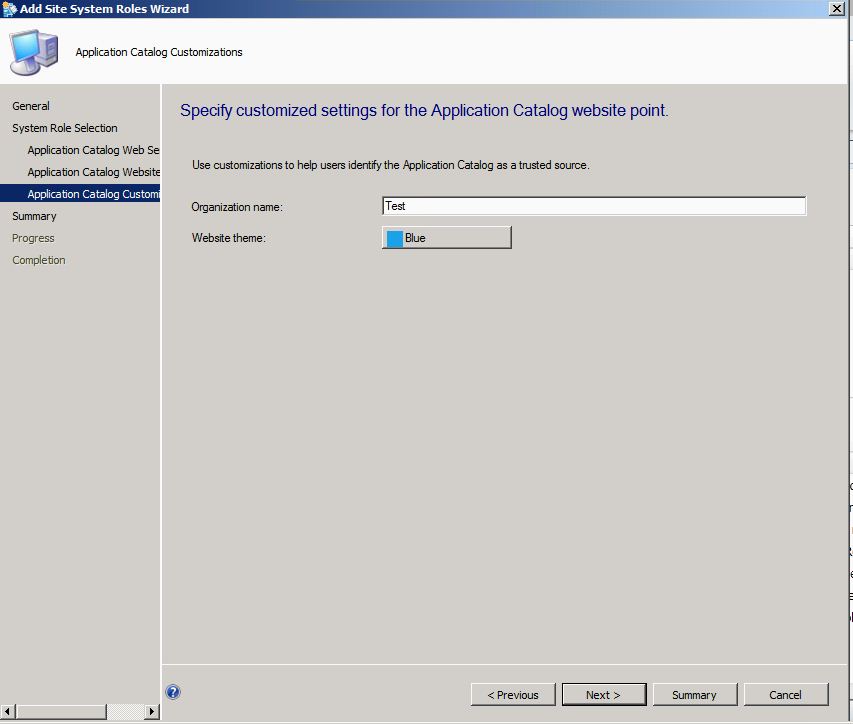
Errror - File Not Found - Application Catalog Error

If you have Faced this Error then In this Post you will find the solution to the problem .

Image


Go to Site Server Roles and Add New role 


Image


Image


Image


Image


Image


Image


Once you have Done all this , Open CMApplicationCatalog and you will be all fine 


Image

Application /Software Deployment SCCM – Part # 4 ( Application Request)

http://sccmconfighelp.wordpress.com/2013/07/24/applications-demystified-part-1/   - Part 1

http://sccmconfighelp.wordpress.com/2013/07/25/sccm-applications-demystified-part-2-requirement/ - Part 2

http://sccmconfighelp.wordpress.com/2013/07/25/sccm-applications-demystified-part-2-detection-rules/   Part 3

http://sccmconfighelp.wordpress.com/2013/07/29/sccm-applications-demystified-part-4-application-request/ Part 4

http://sccmconfighelp.wordpress.com/2013/07/29/sccm-applications-demystified-part-5-application-request-contd/  - Part 5

As has always been , I am trying to Demystify Some of the Coolest new features of SCCM 2012 . One such feature in this series of SCCM Applications Demystified I am Taking up Application request By Client in SCCM .

In SCCM 2012 , You can Deploy a Software on USers Machine and let the User see if he needs the Software . Once the user identifies the Software he Needs , He will request the software via Application Catalog and the software request will then go to SCCM Admin who will then approve or reject the Request .
 Now Isn't that a Cool Feature :

Screen Shots Attached Below :

Image

Image

Image

Image

Image